Buy onceTry free
English Italiano Français

FADE IN:
INT. YOUR STORY - NIGHT

Write it. Shoot it. Own it.

For people who write and produce fiction, from the script to the shooting day. macOS only, for now.

Lucerna carries your film from FADE IN to the last call sheet: a real screenplay editor and a complete production office in one native Mac app. You pay once. It's yours forever. Your talent was never meant to be a rental.

Full app. No sign-up. No credit card. No 'we'll remind you before it renews' email, because nothing renews.

Native macOS · Apple silicon · Works offline

Roll camera

The meter that never runs.

Time on this page 00:00 Billed so far 0.00

That's the entire pricing model. You buy the app. The app is yours. The end.

EXT. THE INDUSTRY - DAY (ONGOING ROBBERY)

Subscriptions are a horror movie.

Somewhere along the way, the software industry decided your craft should be a rental. Pay monthly to type in Courier. Pay monthly to move colored strips around a board. Pay monthly so a server farm can read your unproduced screenplay and call it "a service". Miss a payment and the tools of your own trade lock you out like a repossessed van.

We think that's a racket. That's the technical term. A screenplay doesn't expire on the 1st of the month. A budget doesn't need a landlord. So we built the whole studio the old way, the honest way: you buy it, you own it, it works. Even in an airplane seat with the Wi-Fi off.

1payment. Singular. As in 'one'.
0servers of ours your script passes through
how long it stays yours

THE PIPELINE

One thread of light, from page to set.

Five rooms. One app. Zero re-entering your own data.

  1. 01

    The Page

    A Fountain editor (Fountain is the plain-text screenplay format) with reference-accurate pagination

  2. 02

    The Analysis

    Counts, continuity and search that run on your Mac, when you ask

  3. 03

    The Board

    Stripboard, call sheets, sides. Generated, not typed

  4. 04

    The Ledger

    Budgets with math you can verify, not just trust

  5. 05

    The Set

    Take logs, reports, the whole day zipped for editorial

THE HERO FEATURES

Seven features, up close.

Not concepts. Not a roadmap. What the app does today, with the screenshots to prove it.

ON SET TODAY:

01 INT. THE TIME MACHINE - NIGHT

A time machine that reads like a storyboard.

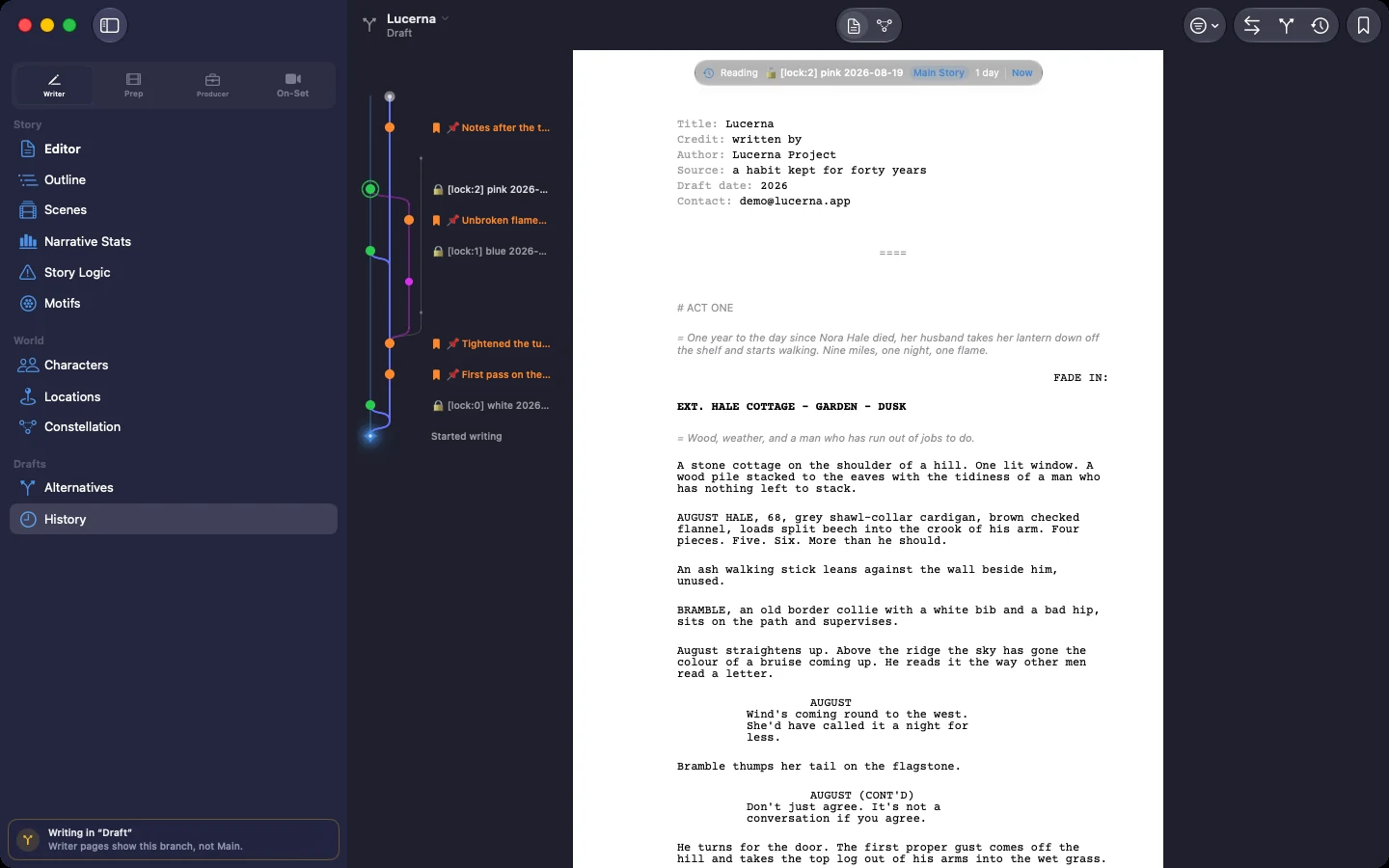
Every draft of your screenplay, drawn as colored lanes that part ways and meet again. Pin the moments that matter, compare any two drafts word by word, and bring any of them back with one click. Nothing you write is ever lost again. Rewrite fearlessly at 3 a.m.

Project history: drafts and alternate endings in colored lanes, the page open beside them

02 INT. THE PDF - CONTINUOUS

The page count a producer can bet money on.

Industry-standard pagination, regression-tested to match page count exactly against three real feature scripts, native Fountain or imported FDX alike, US Letter or A4. Lock a draft and the full 9-color industry revision cycle comes out right: White to Blue to Pink to Cherry, frozen numbering, margin asterisks, OMITTED pages and all. Colored paper, or a colored band on the header only, when the office won't print on stock.

Export PDF: a Blue revision, changed pages only, asterisk in the margin

03 EXT. THE STRIPBOARD - DAWN

A shooting schedule in one click. Then shuffle it like paper.

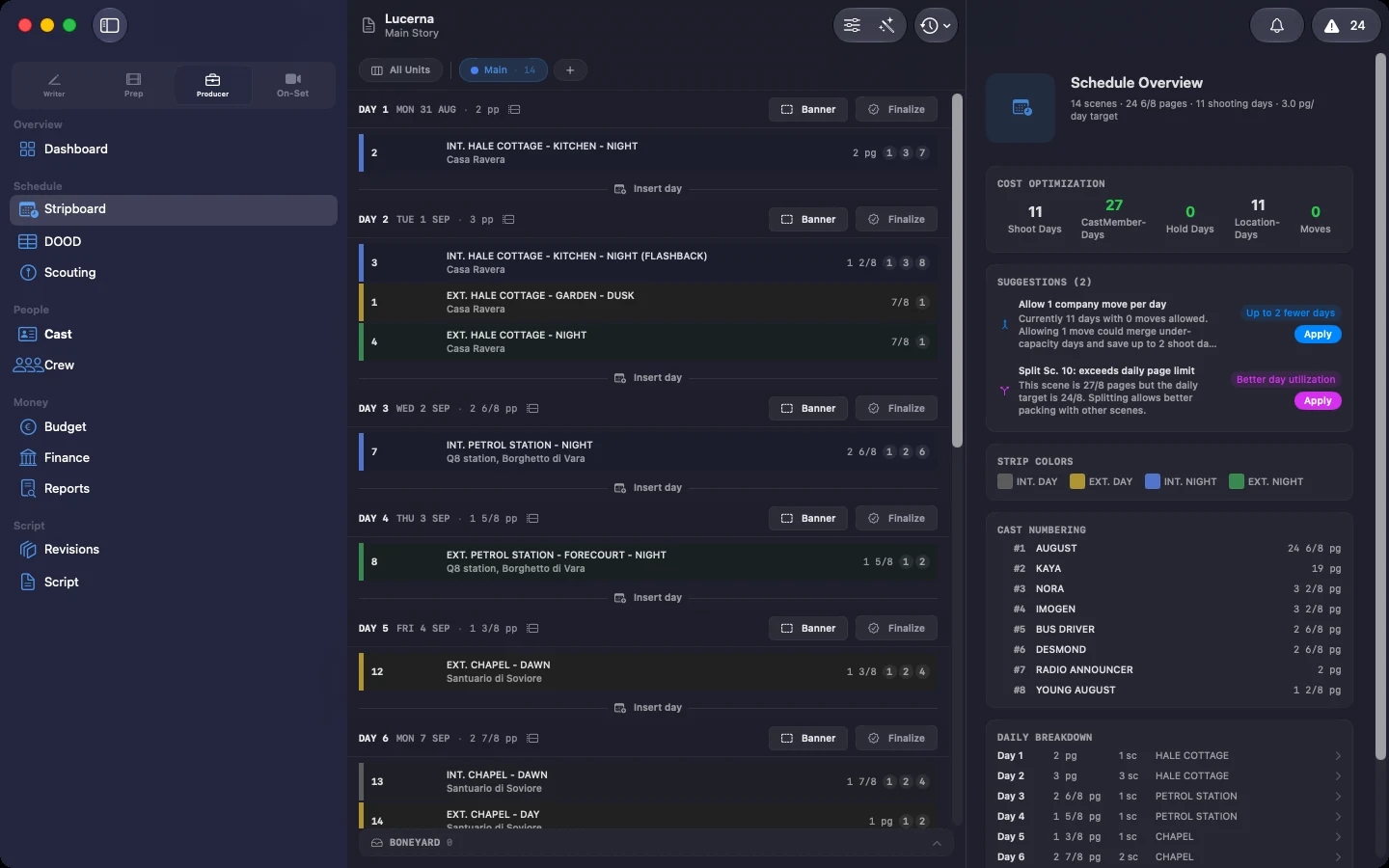
Lucerna builds a day-by-day shoot order straight from the screenplay: locations grouped, cast availability respected, page limits honored. Then it hands you draggable strips (a stripboard is the shoot laid out one strip per scene), one board per unit. It even catches an actor double-booked on two units before anyone makes the call. Cut scenes go to the boneyard, the parking lot for everything you've dropped, and a producer can still find them in there.

Stripboard: the shoot broken into days, with the schedule overview beside it

04 INT. PRODUCTION OFFICE - LATER

The day's paperwork writes itself.

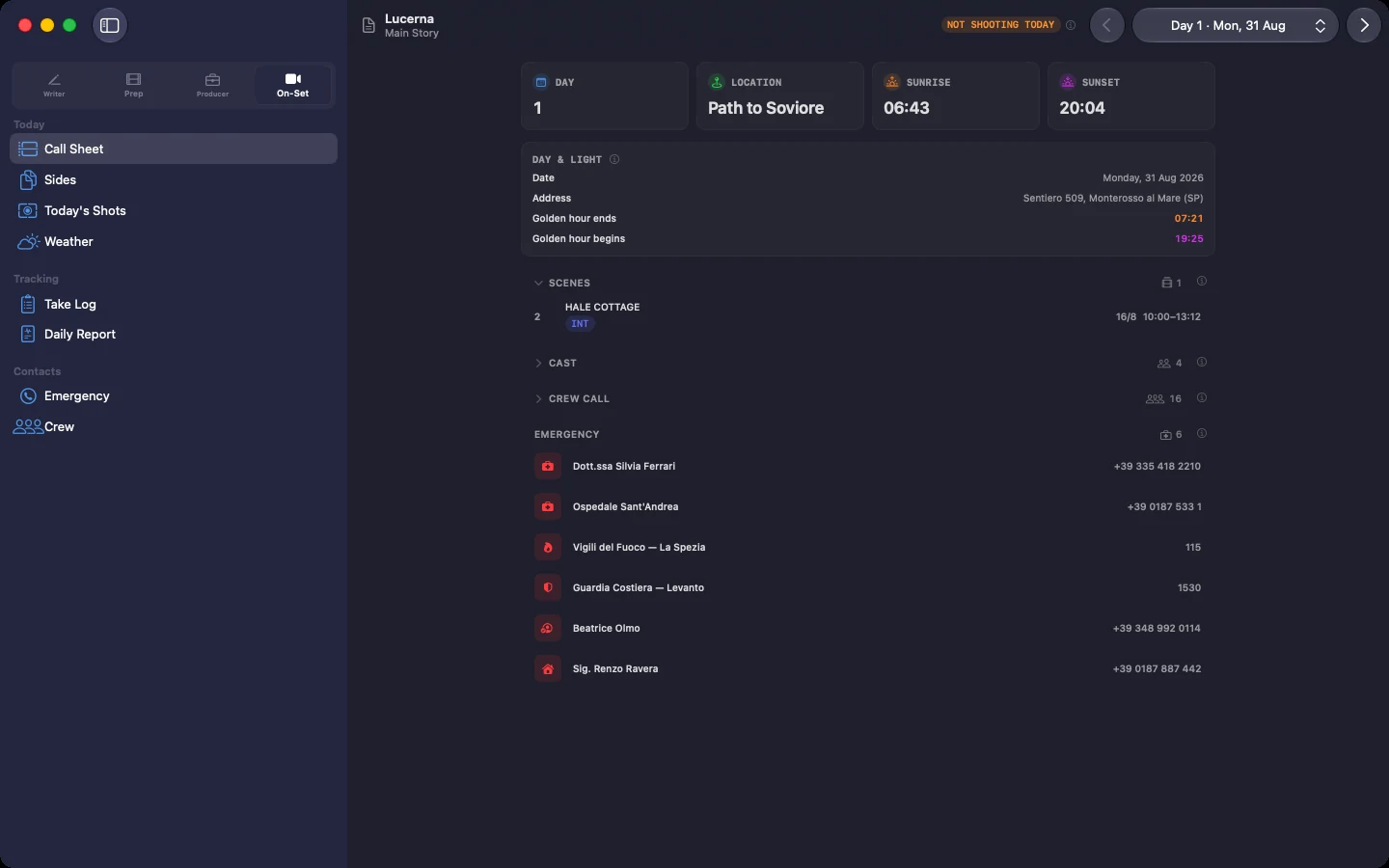
Schedule a day and get a minute-by-minute call sheet (the page that tells everyone where to be and when) with sun-anchored call times, real sunrise and sunset computed offline, meal-penalty and turnaround warnings. Actors get sides, just the pages being shot that day, with a cover carrying your production's name, the call time and the revision color. At wrap, one button zips camera report, OK-takes CSV and sides into a Daily Bundle for editorial.

Call sheet: location, sunrise and sunset with golden hour, the day's scenes

05 INT. THE LEDGER - NIGHT

Price a prop where you're already looking.

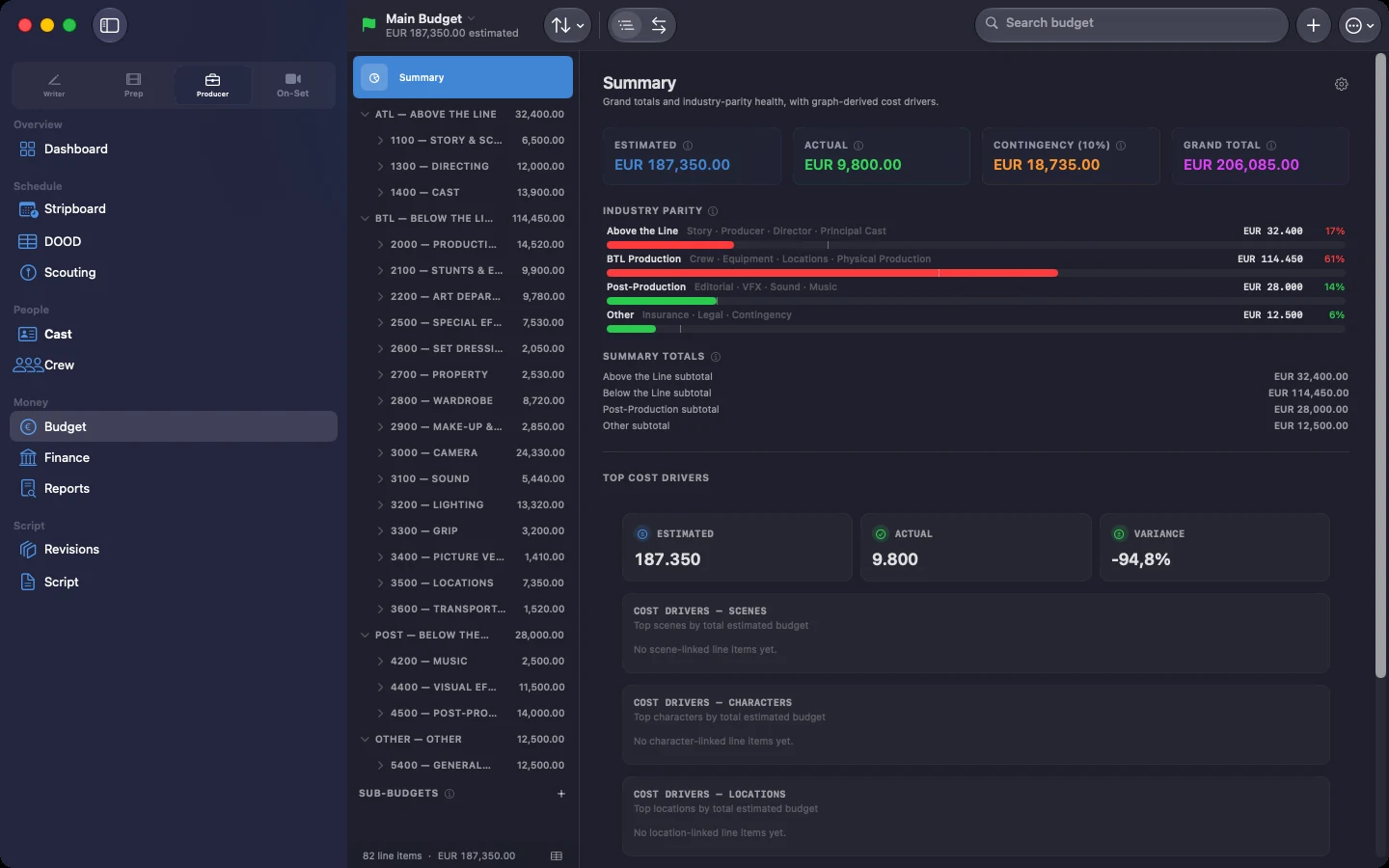
A tiny cost chip lives on every piece of your story: a prop, an actor, a location. Type a rate and it routes itself into the right budget account. Underneath, a deterministic ledger computes gross to net to true employer cost, every step inspectable. Send a report to a coordinator and the amounts they shouldn't see are redacted for real: they can't be recovered by subtraction either. One export produces a hashed audit bundle, PDF and spreadsheet inside, that an accountant or a bond company can re-check without owning Lucerna.

Crew rate card: day rate, projected cost, withholding, social contributions, VAT

06 INT. YOUR MAC - PRIVATE

Checks that run on your Mac, when you ask for them.

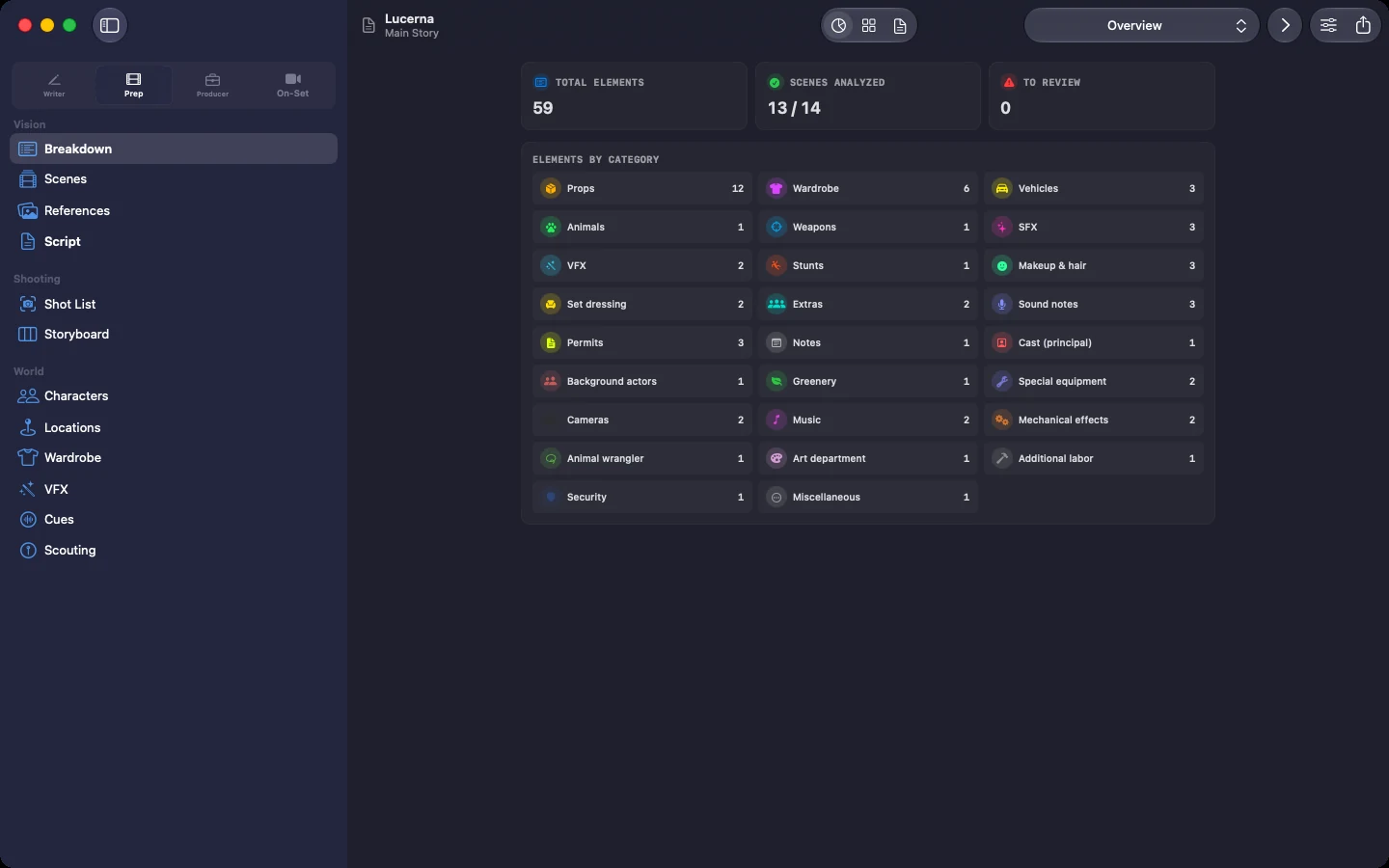
Counts first, no opinions: pages, scenes, read time, who speaks how much, how the script sits between day and night. Then, if you switch it on, a technical pass that looks for the things you forgot rather than the choices you made: a subplot introduced and never picked up again, a prop that changes hands between two scenes shot three weeks apart, a continuity break against the actual shooting order, a character named two ways. Semantic search finds any of it in seconds. It runs on your Mac's own silicon, your pages never leave the machine, and you can turn the whole thing off per project.

Narrative Stats: pages, scenes, read time, INT versus EXT, day versus night

07 INT. THE WRITERS' ROOM - SAME TIME, SAME PAGE

Co-write live. No sign-ups, no Lucerna account.

Your co-writer's cursor glides across the page in their own color, live. Send them a link, a file over AirDrop, or an iCloud share, and they're writing in minutes. No sign-up forms, just the Apple Account they already have. Edits travel between your machines, with Apple's own infrastructure as the fallback route: never through a server of ours, because we don't run one.

Two named cursors on the same page, one of them leaving an inline note

THE GRIMOIRE

Every spell in the book.

The hero reel is the trailer. This is the film. Seven departments, one coherent app. Here's a taste of each.

I The Editor 6
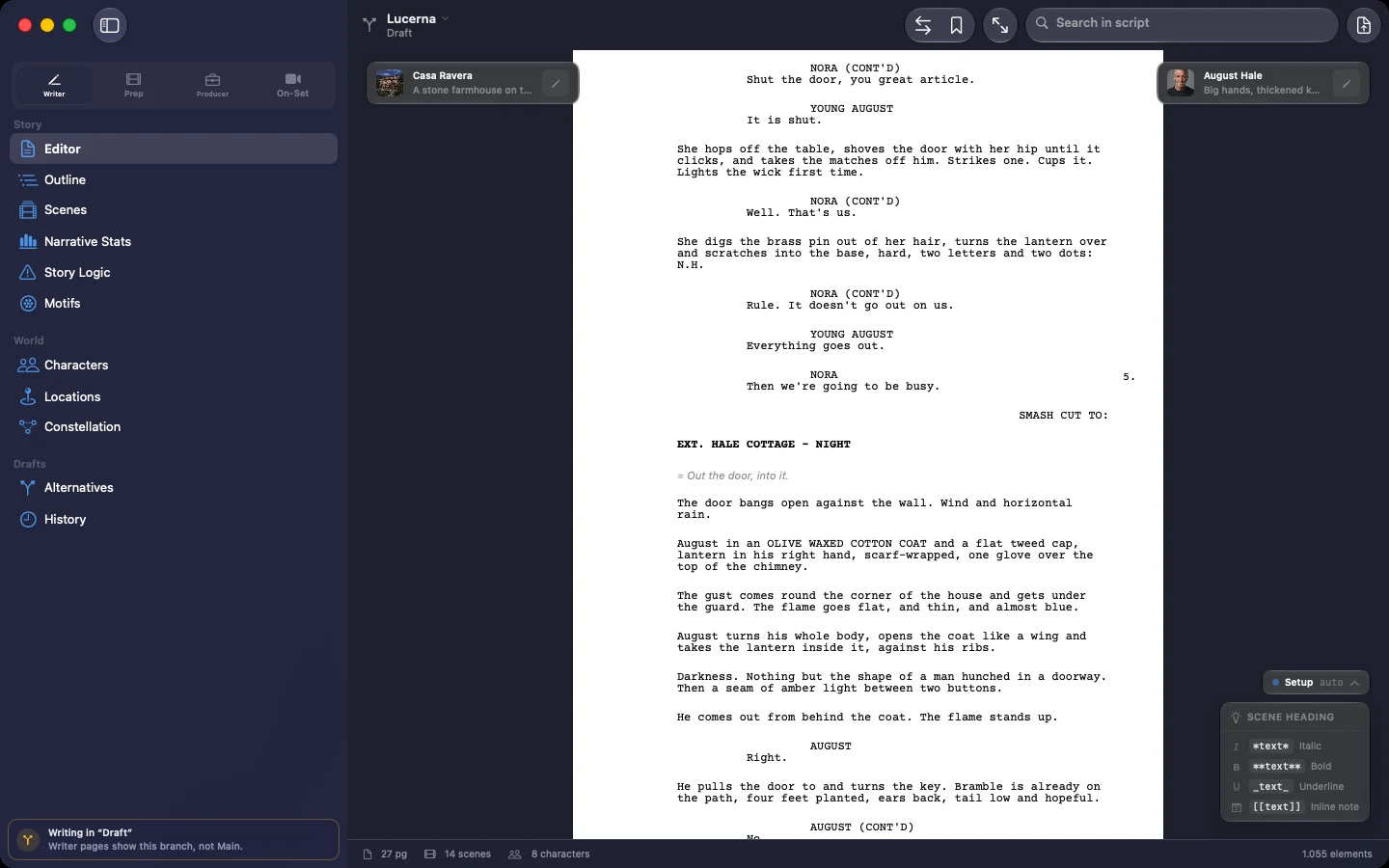
  • Live Fountain styling: type plain text, watch real screenplay formatting appear
  • Continuous paginated page view with pinch-zoom
  • Context-aware autocomplete for names, places, transitions. Fully offline
  • Find & replace with live match ticks across 100+ pages
  • Import from .fdx with exact page-count parity
  • Floating scene cards: who's in this scene, where it happens
II Story Tools 6
  • Narrative stats at a glance: pages, scenes, read time, dialogue and action split
  • Continuity and dropped-thread checks, on your Mac, run when you ask
  • Semantic search across the whole script, offline
  • Motif tracker: every place a recurring image or object comes back
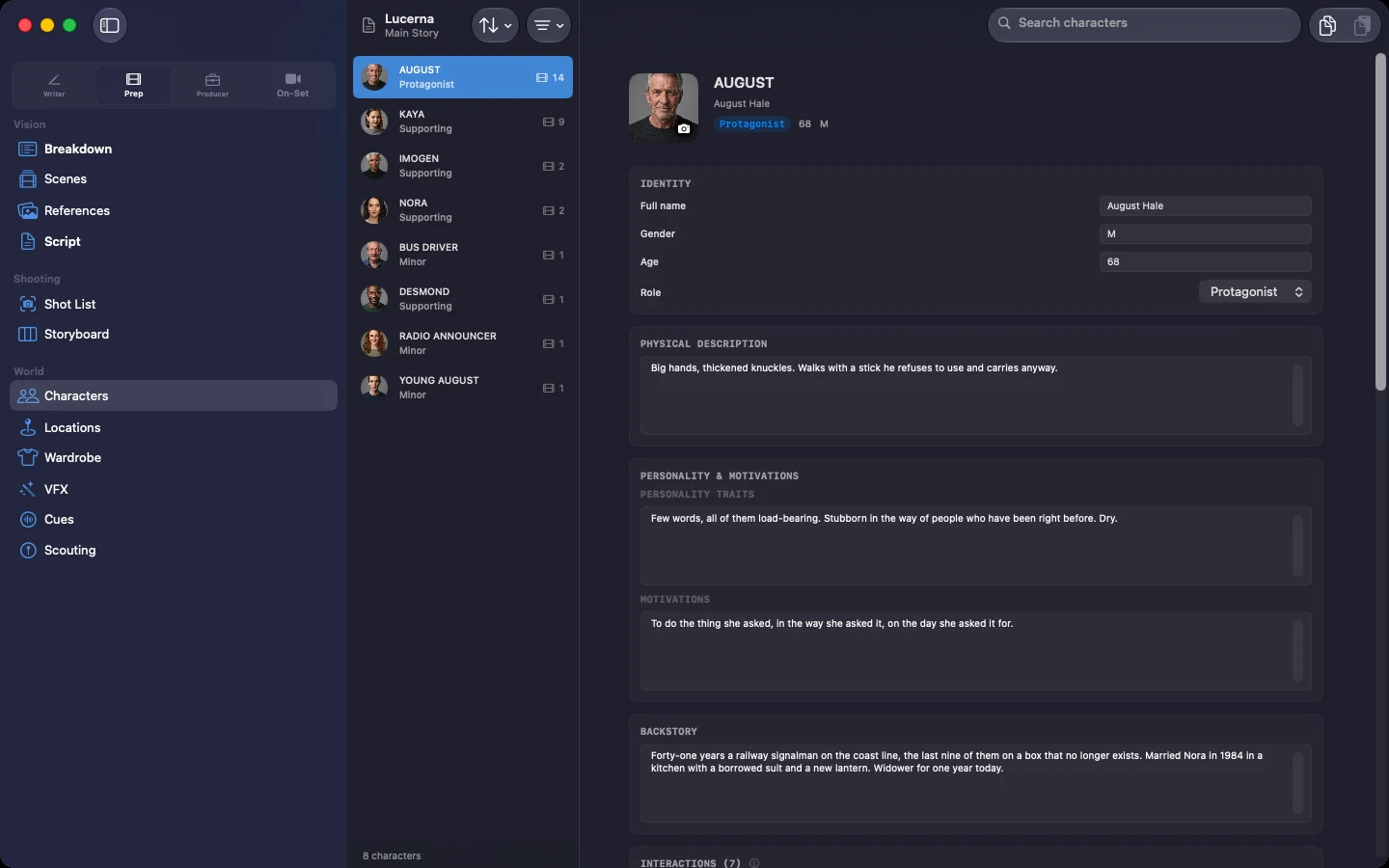
  • Character tracker: where each name appears, and where it stops appearing
  • Optional structure templates, if that's how you work. Off until you switch them on
III Scheduling 6
  • Multi-unit stripboard with drag-and-drop and Gantt view
  • Cross-unit conflict detection before the day is called
  • Day Out of Days (the DOOD: who works which day, on one table) with one source of truth
  • Offline sun position and golden hour from a built-in ephemeris
  • Local holidays for ~12 countries, down to Italian patron-saint days
  • Non-destructive regeneration: rewrites don't nuke your manual tweaks
IV Paperwork 6
  • One-click report catalogue: PDF, CSV, JSON
  • Call sheets, sides, camera reports, DPRs, revision memos
  • Sides with a branded cover: your production's name, the call time, the revision color
  • Industry-parity formats a 1st AD can hand a union rep
  • Budget-amount redaction that survives even subtraction
  • Emergency backup: your whole history as plain text, anytime
V Finance 7
  • Cost-as-you-write budgeting, straight from the script
  • Chart-of-accounts templates you adapt to whoever is funding you
  • Gross to net to true employer cost, step-by-step inspectable
  • Round-trip with the industry's scheduling and budgeting formats: .mmsx and .mmb
  • Audit bundles with a PDF and a spreadsheet inside, hashed so anyone can re-check them
  • Per-line currencies, converted with a rate table you keep yourself, not a live feed
  • Budget scenarios: cut the second unit without wrecking the master
VI Collaboration 7
  • Live peer cursors with names and colors
  • No sign-up invites: a link, an AirDrop file or an iCloud share is enough, and what travels goes between your collaborators' devices, never through a server of ours
  • Story Alternatives: try another ending, compare, weave the best one back
  • Permissions by role: everyone reaches what their own job needs, and stops there
  • Two writers in one document: named cursors, per-role permissions, edits that merge without overwriting each other
  • Tamper-proof signed lock chain, verifiable offline
  • Synced photos and attachments across every machine
VII The Platform 6
  • Native macOS, built on Apple's design language
  • Workspace Hub for every project you're running
  • Persona setup: writers aren't shown a stripboard on day one
  • Finder Quick Look: spacebar shows the formatted page
  • Analysis engines run on your Mac: downloaded once, no per-request cloud bill
  • iOS companion for on-set take logging on the same network

THE EXORCISM

Versus the usual suspects.

An honest comparison, category by category. Where we're different, and where we're not.

the legacy screenwriting editor

The monument

  • Their pipeline ends where yours begins: no schedule, no budget, no call sheets.
  • Their history is a flat list. Ours is a storyboard of drafts you can compare word by word.
  • They format your script. Lucerna also counts it, searches it and checks its continuity.
  • We import their .fdx with exact page parity. Coming back out is PDF and plain-text Fountain today: .fdx export isn't built yet, and we'd rather say so.
cloud writing tools

The landlords

  • Their 'your script, anywhere' means 'your script, on our servers, while you pay'.
  • Stop paying and see how 'yours' it really is.
  • Lucerna co-writes in real time. A link, an AirDrop file or an iCloud share is enough, no sign-up walls.
  • Writing and analysis work offline: in a bunker, on a plane, forever. Live co-writing is the one thing that needs a connection, and it goes between your machines over Apple's infrastructure, never ours.
the scheduling & budgeting duo

The twins

  • Two separate paid products. No screenplay editor. No continuity checks. It's 2026.
  • Our budget shows its math: a verifiable audit trail, not just a confident number.
  • Sun-accurate call times and comune-level Italian holidays, computed offline.
  • Full round-trip: .mmsx and .mmb in and out. Adopting us doesn't exile your partners.

Every claim is based on Lucerna features already in the app. We compare categories of tools, not brands. And never vaporware, ours or anyone's.

INT. YOUR MAC - BEHIND CLOSED DOORS

The magic never leaves the room.

Semantic search, breakdown tagging, story analysis: all of it runs on your Mac's own silicon. No prompt leaves the machine. No server logs your twist ending. No terms-of-service update quietly starts "training on your content". Your unproduced screenplay is exactly as private as the drawer it used to live in. The one thing that does travel is live co-writing, and it travels between your collaborators' devices over Apple's own infrastructure, never through a server of ours.

  • Advanced analysis engines, on your Mac, yours
  • No content, no titles, no project metadata: the app sends us no usage data about what you write
  • Writing and analysis work fully offline
  • Plain-text export of your entire history, always

THE PRICE

Pay once. Own forever.

Two lifetime tiers. A real trial. And a number that never repeats itself.

7-day free trial · full app · no credit card · no sign-up

How it works: download Lucerna from the Mac App Store, use the whole app for 7 days, then unlock it with a single purchase. No card to start, no account to create, nothing to cancel. Requires a Mac with Apple silicon, macOS 14 or later.

Screenplay

€79

one payment, forever

The whole writers' room: editor, analysis, drafts, co-writing.

  • Professional Fountain editor with reference-accurate PDF
  • On-device story analysis, opt-in
  • Complete draft history & alternate endings
  • Real-time co-writing, no sign-ups
  • Import from .fdx, industry revision colors
  • Producing it yourself one day? Production adds the office for €270 more, and this stays yours.
Buy Screenplay — €79
The full studio

Production

€349

or €270 if you already own Screenplay

The whole writers' room, plus the entire production office.

  • Stripboard, DOOD, call sheets, sides, reports
  • Cost-as-you-write budgeting & verifiable ledger
  • Round-trip with the industry's scheduling and budgeting formats
  • On-set take logging & Daily Bundle
  • The writers' room is included: your writers work in the same project, not a separate purchase.
  • Started with Screenplay? Production is €270, the difference. Ever heard a subscription say that?
Buy Production — €349

Both tiers are enforced in code, not in marketing: buy Screenplay once for €79, add Production later for €270, own both forever. One purchase covers the Macs signed in to your Apple Account. No renewals, no "contact sales", and an invoice to a VAT number is one email away. Requires a Mac with Apple silicon, macOS 14 or later.

FAQ

Questions people actually ask.

Is it really not a subscription? Not even a sneaky one?

Really. Two lifetime tiers, one payment each, enforced by the app's own licensing code. There is no monthly anything. The trial doesn't even ask for a card, so it physically cannot "forget" to stop charging you.

How much is it, exactly?

Screenplay is €79. Production is €349. If you own Screenplay and want the production office later, it's €270, the difference, and nothing you already paid is wasted. One payment each, through the Mac App Store: those are the store's prices, VAT included where it applies, and if you need an invoice made out to a company, write to support@luminosfilm.com. That is the entire price list, and it's the same list in every country we sell in.

What happens on day 8 of the trial?

Nothing is deleted. The projects you started during the trial stay yours and keep opening: you can read them, print them, and there's an Export Everything button that packages all the work you did during the trial, PDF and plain-text Fountain included, even if you never pay. What stops is editing, until you buy. We're not holding your pages hostage to close a sale.

Do the analysis tools send my script to a server?

No. Everything runs on your Mac: semantic search, breakdown tagging, story analysis, all of it. The deep features work with Wi-Fi off. Your script stays on your machine, where scripts belong.

I have twenty years of .fdx files. Can I get them back out?

In, yes. Out, partly, and here is the unvarnished version: there is no .fdx export yet. Import is at exact page-count parity, regression-tested against three real feature scripts, so the draft your production budgeted against stays the same length. On the way out you get reference-accurate PDF, US Letter or A4, and your entire draft history as plain-text Fountain, which every screenwriting app reads. Schedules and budgets do go both ways, in .mmsx and .mmb.

How does co-writing work without sign-ups?

You send your co-writer a link, a file over AirDrop, or an iCloud share, and they're in, live cursors and all, in minutes. No Lucerna account, no sign-up form: the Apple Account they already have does the job. Their edits and yours travel between your machines, using Apple's infrastructure as the fallback route, and never through a server of ours, because we don't run one. Permissions are role-based, so whoever runs the schedule never touches your dialogue.

Two writers on the same scene. What happens?

You both write. That is the case co-writing was built for: your cursors move across the page live, each in its own color with the name on it, and your edits merge instead of overwriting each other, because the app was made for two people typing at once rather than for one person at a time. Permissions are set per role, so what each of you can change follows the role you came in as. The history records every pass with its date, so who moved what, and when, is never a matter of opinion. And when the scene wants to go two ways, Story Alternatives holds both versions of it side by side until one of you decides, then weaves the surviving one back into the draft. Two people, one document, the same minute: that is what this is for.

What do I need to run it?

A Mac with Apple silicon, macOS 14 or later. The analysis models download once, they're a few gigabytes, and the download resumes if the line drops. PDFs come out US Letter or A4. There's an iOS companion for take logging on set, on the same network as your Mac. Intel Macs are not supported, and we'd rather say it plainly than hedge: Apple has retired Intel from its own development tools, and we won't sell you an app that's aging on the day you buy it.

How many Macs does one licence cover? Can I have an invoice?

One purchase covers the Macs signed in to your Apple Account: your desktop and your laptop, not the whole floor. Buying for a company, or need an invoice to a VAT number? Apple Business Manager handles volume purchases, or write to support@luminosfilm.com and a person will sort it out with you. We're Luminos Film S.r.l., Via Pietro Piffetti 48, Turin, VAT IT12361020014. There is a company here, with an address. The licence itself, the EULA, is published on this site under Legal: you can read it before you buy, instead of after.

I pay once. What does 'forever' cover when it comes to updates?

What you're buying is Lucerna 26, and every 26.x update is included: fixes, new features, and keeping up with new versions of macOS. When a next major Lucerna ships someday, it will be a separate purchase and a choice, never a switch we flip on you: Lucerna 26 stays alive, licensed and working, keeps opening your projects, and nothing expires because you said no. Lucerna 26 also stays on sale: you can still buy it and install it after the next version ships, which matters if a writer joins your room in month fourteen and everybody has to be on the same build. And if we disappeared tomorrow, your projects are files on your own Mac, and the exports below don't need us to run.

Windows? Ever?

Not today. A multi-platform version is in the works, honestly without a date: right now every hour goes into making the Mac version the best thing we have ever built, and we won't sell you a waiting list. If you want one email on the day a Windows build is real, write to support@luminosfilm.com and you'll get exactly that, one email.

I start from a storyboard, not a screenplay. Is this for me?

Today, no, and we'd rather lose the sale than waste your afternoon. The schedule, the call sheets and the budget are all built from the screenplay: that is where Lucerna reads the scenes, the locations, the cast and the page count from. There is no way in that starts from a shot list or a storyboard with no script behind it. If that is where your work lives, an agency board, three lines of copy, a shoot on Thursday, then Lucerna doesn't do your job today. If you want to know the day that changes, write to support@luminosfilm.com and we'll tell you. No newsletter, just the answer.

What happens to my work if I stop using Lucerna?

You keep everything, twice over. Your projects live on your Mac, and one click exports your entire draft history as plain Fountain text. The production side comes out too, in formats other people's software opens: the schedule as .mmsx, the budget as .mmb and CSV, the breakdown as CSV, call sheets, sides, DOOD and reports as PDF. Even the audit bundle carries a PDF and a spreadsheet inside, so its numbers survive without us. Lucerna is deliberately built to not be a trap. Which is easy, because we have no recurring revenue to protect.


FADE OUT.

The tools are yours now.
Go make the thing.